Free offline dictation for Windows. Hold two keys, speak, let go.
HoldToType is a free, open-source push-to-talk dictation app for Windows. Hold Ctrl+Win, speak, let go: the words land at your cursor in any program, and nothing has left the machine.

I made this program for myself, and decided to share it.
HoldToType started as a program for my own computer. I wanted to dictate without a subscription, without an account, and without my voice leaving the machine. When it worked, I put it on GitHub so that anyone can use it. It is free and it will stay free: there is no paid version, no credits and no word limits.
You can check it yourself.
The source code is on GitHub under the MIT licence. Anyone can read it and build the program on their own computer from the same sources, to be sure it does only what this page says.
$ git clone https://github.com/Vitalii-Yemets/holdtotype
$ cd holdtotype
$ .\build.ps1
The settings window, as it is. Click around.
This is the real window from the program, not a picture. Switch the design and the language, open every section. Nothing here records or saves anything.
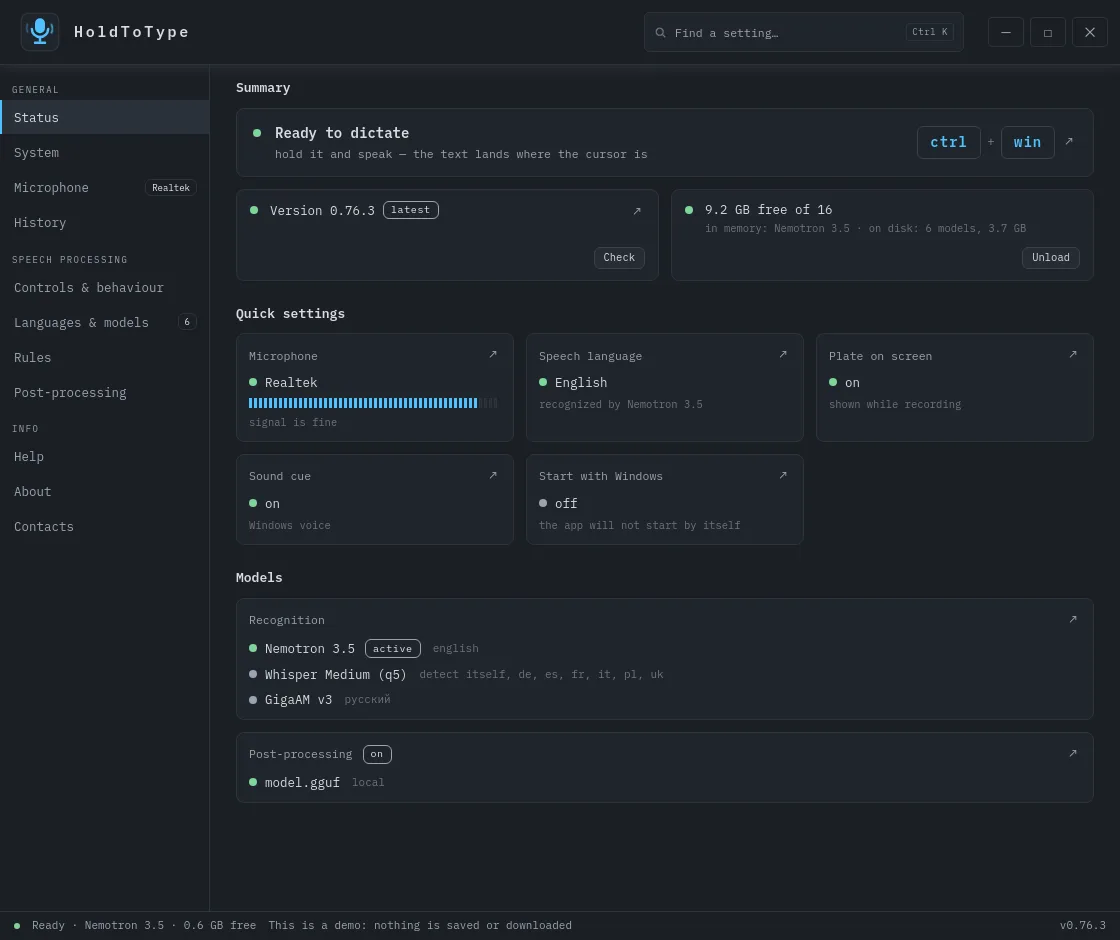
The live window opens on a desktop screen; on a phone this is a picture of it.
Hold, speak, let go. The program stays in the tray.
Works in any program that has a text field: mail, chat, code, forms, the address bar.
Hold
Keep the two keys down. A small plate appears on the screen and the microphone is live.
Speak
Say a sentence the way you would say it to a person. Names and rare words can be taught.
Let go
The words are pasted where the cursor already was. The recording is dropped at once.
Nothing leaves your computer.
Your voice goes from the microphone to a speech model on your own disk, and comes back as text at your cursor. There is no server in between, so there is nothing to upload to and nothing to leak from. Unlike the built-in Win+H voice typing, which sends your speech to Microsoft by default, there is no server here at all.
19:02:41 ready: hotkey=ctrl+win engine=sherpa model=models/nemotron-3.519:04:12 dictation: 6.8 s captured, 0 network requests19:04:13 replacements: 62 -> 64 characters19:04:13 pasted 64 characters into chrome.exe19:04:13 recording dropped19:09:30 dictation: 11.4 s captured, 0 network requests19:09:31 pasted 131 characters into Code.exe19:09:31 recording dropped
These are the program's own log lines. Open the log from the System tab: every dictation writes them, and the network count is there each time.
- Does my voice leave the computer?
- No, never. It goes from the microphone into memory, becomes text, and is dropped.
- Does the text leave the computer?
- No. It is pasted where your cursor was, and kept only if you turn history on.
- Is anything about me collected?
- Nothing. No account, no analytics, no crash reports.
- When does it go online at all?
- By itself, twice, and only by your hand: when you download a model, and when you press Check for updates.
After a normal install, nothing is sent anywhere.
Two optional settings can change that, and both are off until you turn them on.
If you enter the address and key of an online model for post-processing, your text goes to that service to be cleaned up. Your voice still does not.
If you point the program at a recognition server on another machine, for example a stronger one in your home, your voice goes to that machine.
What it does.
A model for each job, not one for everything
Nine speech models to choose from: Nemotron 3.5 for speed and live text, Whisper for 99 languages and translation, Parakeet for 25 European languages. The program keeps one per language and switches by itself.
Which model for which language →Live text
With Nemotron 3.5 the words appear on the plate while you are still talking. The other models show the text when you let go.
Translation
Speak in your language and get the text in another: English, German, Spanish, French, Italian, Polish or Ukrainian. Whisper does the translating; if your language runs on a faster model that cannot translate, the plate offers to hand the sentence to Whisper.
An editor on your disk
A small language model, run on your computer, takes out fillers, fixes punctuation and changes tone. The prompts are yours to edit.
Your vocabulary
Replacements, a dictionary of rare words and names, voice commands such as "new line".
A folder, not an install
Copy it to a stick. Delete it and it is gone.
Next to the alternatives.
The programs people compare us with most often. Honest, including where we lose.
| HoldToType | Handy | Wispr Flow | Dragon | Whisper Flow | DictaFlow | Typeless | |
|---|---|---|---|---|---|---|---|
| Code-signed builds | Not yet i | Yes | Yes | Yes | Yes | Yes | Yes |
| Price | Free | Free | $12 / month | $699 once | From $9 / month | $7 / month | $12 / month |
| Subscription or credits | None | None | Subscription | One-time licence | Credits | Subscription | Subscription |
| Account | None | None | Required | Required | Required | Required | Required |
| Audio leaves your computer | No | No | Yes | No | Yes | Yes | Yes |
| Works offline | Yes | Yes | No | Yes | No | Paid option | No |
| Open source | MIT | MIT | No | No | No | No | No |
| Languages | 99 | 99 | 100+ | 7 | 100+ | 90+ | 100+ |
| Live text while speaking | Yes | No | No | Yes | No | No | Yes |
| Translation | 7 languages | No | No | No | No | No | Yes |
| Editing by a local model | Yes | No | Cloud | No | Cloud | Cloud | Cloud |
| Custom vocabulary | Yes | No | Yes | Yes | Yes | Yes | Yes |
| Portable folder | Yes | No | No | No | No | No | No |
Prices and features as published by each maker in September 2026.
Full comparison →Questions.
What does it cost, really?
Nothing, and there is no catch. I wrote HoldToType for myself, to dictate on my own Windows computer without a subscription and without my voice going anywhere. Then my colleagues started using it. Now I have made it available to everyone, so it is completely free: no paid version, no credits, no word limits, no account. The models are free downloads and run on the computer you already have. The source is on GitHub under the MIT licence.
Does anything I say go to a server?
Not by default. The recording goes from the microphone to a model on your disk and is dropped the moment it has become text. Two optional features can reach outside the program, and both are off until you set them up yourself:
- Post-processing by a bigger model. The built-in editor is a small model on your disk. If you want a big one, you can point the program at a large model running somewhere else: another program on this computer, a server in your home, or an online service with your own key. Then your text goes there. Your voice still does not.
- A recognition server that is not next to the program. Normally the recogniser runs from the program's own folder. You can instead point it at one running separately: on this same computer, in Docker, or on another machine. Your voice goes to wherever that server is.
The only other network activity is model downloads and the update check, and those are buttons you press.
How well does it hear my language?
Well, and you can tune it. The program comes with a catalogue of nine speech models, each good at something different, and you pick one per language:
- Nemotron 3.5 is the default: fast, forty languages, and it shows the words while you are still talking. It does not translate.
- Whisper covers 99 languages and is the one that translates, but it is slower.
- Parakeet is fast and accurate for 25 European languages.
- Canary handles English, German, Spanish and French and translates between them.
The program keeps one model per language and switches by itself, so you can have Nemotron for everyday dictation and Whisper standing by for translation. The docs list which model to take for which language.
Why does Windows warn me when I run it?
The program is not code-signed yet, so SmartScreen shows its warning once. Work is under way to publish HoldToType in the Microsoft Store: a Store build is signed, and the warning goes away with it. Until then, every release comes with a SHA-256 you can check, and you can build the exe yourself from the sources.
What does it need from my computer?
Windows 10 or 11, x64, a microphone, and about a gigabyte of disk for a model. No graphics card is needed.
Who makes this, and why?
I do: Vitalii Yemets, one developer. There is no company, no team and no investors: one person writes it, answers the issues and ships the releases, all in the open on GitHub. It started as a tool for my own desk and for a few colleagues, and it stays free because I would have written it anyway. If something is wrong, write to me: an issue on GitHub or holdtotype@outlook.com.
Say the next thing you were about to type.
Installer
holdtotype-setup.exe · 0.76.4 · 35.9 MBPicks the folder and the first model, makes a shortcut, can remove itself.
Download the installerPortable
holdtotype-portable.zip · 0.76.4 · 28.7 MBUnpack anywhere and run. Nothing is written outside its folder.
Download the archiveWindows 10 / 11, x64. Not code-signed yet, so SmartScreen warns once. SHA-256 for every file on the releases page.